Should you automate it?
Before we build anything, the most underrated question in this whole space: should I even automate this?
Is it worth the time?
Should I even automate this?
Speaker notes
About 2 minutes. Open with the question: should I even automate this?
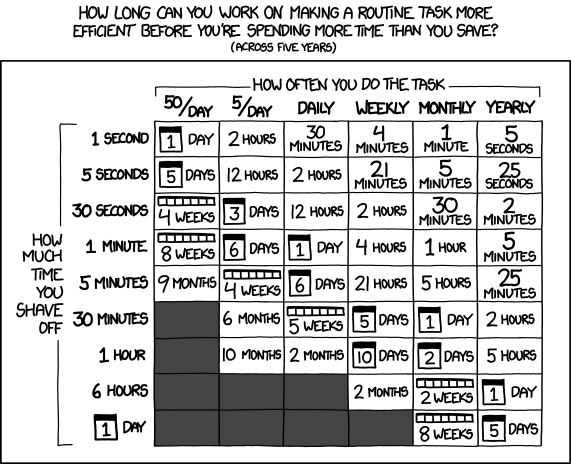
This comic compares how often you do a task with how much time you save each time. It forces the part most of us skip: the math.
Read one cell out loud: shave 5 minutes off something you do daily, and you can spend up to 6 days making it faster.
Try it with your own task
Pick a task. Then pick two numbers.
6.3 days
Over five years, that is how long you could spend making it faster before you lose time.
That is about 152 hours in total. The comic’s cell says: 6 days.
The comic rounds its numbers and assumes you keep doing the task for five years. A “day” here is 24 hours, not a workday. Build time only: maintenance is not in this math.
The same idea in the ROI calculator from my course (opens in a new tab).
Speaker notes
About 3 minutes. Ask the room for a task they repeat. Set the two dropdowns, read the big number.
Then click my example: something that takes 5 minutes, once a year, with 10 hours to automate it. Not a great investment.
The most useful part is not the number. It is the thinking it forces you to do.
Return on investment
The time you save should be greater than the time you spend building it.
How long does this take me now?
How much faster would it be after I build it?
How often do I even do this?
Confession: I am the kind of person who would spend 40 hours automating something that takes me 10 minutes a week.
Speaker notes
About 1 minute. ROI for automation: the time you spend building should be less than the time you save over a reasonable period.
The confession: I build Rube Goldberg machines. This triggers that, that feeds into this other thing, it is all so elegant. Six months later something changes, the whole thing breaks, and I have no idea why. So pausing to ask “is this worth it?” comes from experience.
Hidden costs
Some costs a calculator can’t see.
Maintenance
External systems change all the time.
- An update happens.
- A feature gets renamed.
- A service changes how it connects.
Over-engineering
Aim for “good enough” to avoid feature creep.
- Features you don’t need.
- More complex than it has to be.
- “While I’m at it, I might as well also…”
Ask first: how would I know if this broke?
Speaker notes
About 2 minutes. Maintenance: automations break, and a silent failure is worse than a visible error. Every automated process you create is a system you are now responsible for keeping alive.
Over-engineering: “while I’m at it, I might as well also…” is feature creep, the enemy of “good enough.”
The upkeep worries in the client proposals: who maintains it, ongoing tool costs, energy use.
The value of manual processes
Some costs aren’t about time at all. Guess what each one would cost you.
The hand-typed weekly report
Looks like a perfect automation candidate.
What would you lose?
AwarenessPutting it together may be how you stay informed.
Personal welcome emails
Easy to template and send.
What would you lose?
ConnectionWriting them may be how you build relationships with new people.
Reviewing data by hand
Slow and repetitive.
What would you lose?
QualityIt may be how you catch errors before they snowball.
Automation handles rules well. It handles nuance poorly. Automating judgment often means automating errors.
Speaker notes
About 2 minutes. Let the room guess before you open each card.
Automating these might save you twenty minutes, but it could cost you awareness, relationships, or quality.
The “describe it to a robot” test: if you can write the exact steps with no room for interpretation, you can probably automate it. If you keep adding “unless…” and “it depends…”, you are in judgment territory.
Every project today has a “stays manual” line. This is where it comes from.
Solving the wrong problem
Consider that the current system may be fine, with no real problem to solve!
- Sometimes the task shouldn’t exist at all.
- Maybe you don’t need an automated report. Maybe you need a five-minute conversation with your team.
- Is it slow because of my time, or because I’m waiting on approvals or on someone else? Automation won’t fix the second one.
Automation decisions require judgment, not just math.
The chart can tell you whether the numbers work out. It can’t tell you whether you should do it.
Speaker notes
About 2 minutes. Only you can decide, by thinking about context, about what you would lose, and about whether the task is actually the problem you need to solve.
Keep it short here. This idea comes back at the close, right before Charles Kemp’s session on the problem behind the problem.
Today’s thesis: the smallest useful unit
The IDEA framework from my course:
-
Identify
What does “done” look like?
-
Document
Data source, transformation, output. What’s fixed? What varies?
-
Today’s focus
Experiment
Choose one component to test. Start with the smallest workable version.
-
Adjust
What could break if something changes? Who else is affected?
Today we apply that to each client project.
Find the smallest useful step worth automating. Have AI build it. Run it on test data. Keep the judgment calls manual.
11 client projects, three shapes
Speaker notes
About 3 minutes. Walk the four IDEA steps fast, land on Experiment: “start with the smallest workable version.” That is today’s thesis.
Next: each team finds its project and says its smallest useful unit in one sentence. The one on the projects page is a starting point to argue with, not an assignment.
Click through to page 2 at 2:00.
Your notes: is it worth it?
Type as you go. It saves in this browser. The My notes button (bottom right) downloads everything from every page as one file.
Site: tinalasisi.github.io/automating-without-overwhelming-yourself · Source on GitHub